Forget the console, you carry it in your pocket. All you need is Abxylute M4 (test)
Modern smartphones are a piece of efficient electronics that we always have with us. It might seem that this is only one step away from the perfect equipment for mobile gaming, but there is one quite important obstacle along the way: controls. For many people, touch-controlled games are a heresy that should not exist.
Is it right? A secondary issue. The important thing is that recently several gadgets have appeared that have a chance to finally solve this problem. One of them is Abxylute M4i.e. a compact controller that can be attached to the phone using a magnet (MagSafe) and can be easily taken anywhere. I decided to check if it actually works in action.
We can buy Abxylute M4 on AliExpress approx. PLN 180. At this price, in addition to the controller itself, we get a short wrist lanyard and a magnetic sticker for phones without built-in MagSafe. Unfortunately, the device is not available in Polish stores yet.
Appearance and dimensions
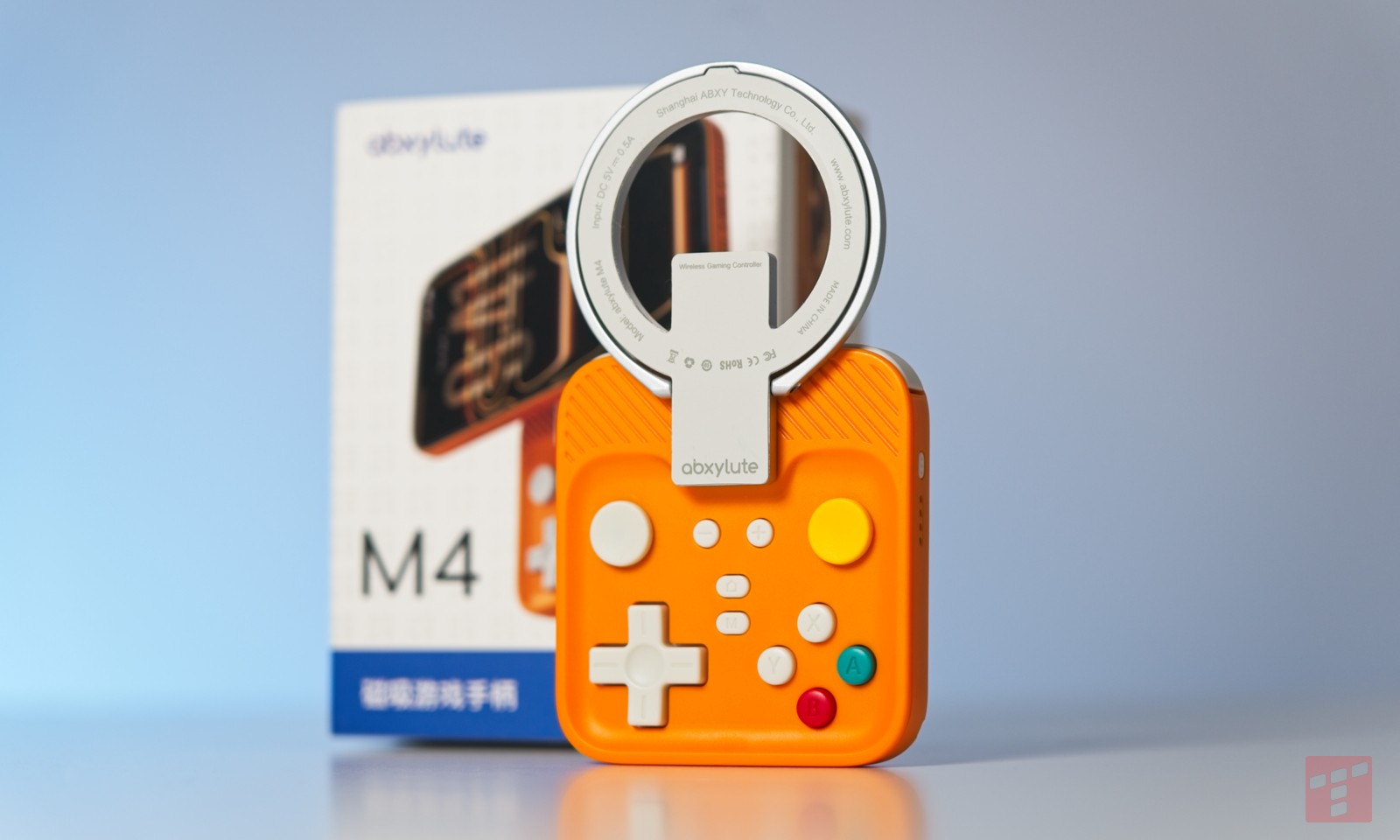
The controller itself consists of two elements: a metal ring with magnets and the controller itself. The first one is primarily a mounting element thanks to which we can attach the whole thing to the phone. All the “meat” is hidden in this second element.

And here may be the first surprise, because unlike other controllers – including ultra-compact ones – Abxylute M4 is almost perfectly square. Its dimensions are approx. 7 x 6.5 cm and 1.5 cm thick. It’s all made of plastic and weighs very reasonable 55g. However, it is worth remembering that this is the mass without the previously mentioned metal hook – after adding it, the value doubles.
Keys
With such small dimensions, compromises are inevitable. Some of them make themselves felt at first glance. Most of the buttons are located in a special recess on the front of the case. Seemingly, we are dealing here with a typical one modern keyboard layouti.e. two analog sticks, a D-pad and four action buttons. However, their position has been slightly modified – both “knobs” are located above the action keys, and the buttons are smaller than on a typical pad and resemble those on Nintendo Switch.

Why did I put “knobs” in quotation marks? Because technically they are not knobs, but discs that slide flat. A similar solution appeared in the past, among others: on PSP and Nintendo 3DS. It’s easy to understand why the manufacturer chose it, although it is a noticeable compromise. What’s more, this excludes the use of typical “clickable” L3 and R3, which are instead invoked by a shortcut with a function key placed in the middle.
And speaking of the buttons, their dimensions resemble those of JoyCons for Nintendo Switch, and as a mechanism they use rubber membrane. They operate quietly and precisely, but have a hard jump and relatively slow rebound, which can be noticeable in some games. In general, however, they perform well for a miniature pad.

At the top we will find a set of L and R buttons. These are based on microswitchesand the triggers do not support analog mode. What’s more, they were placed in one line, as in Nintendo 3DS, for example, and not in a back-to-back arrangement, as most players are probably accustomed to.

As for other elements, it is definitely worth mentioning the power/pairing button on the right, located just above the LEDs indicating the connection and battery charge status. We will connect the power cable to the port located at the bottom USB-C, and in the corner there is a hook for a lanyard (e.g. the one included in the set).
Fixation and comfort
The metal ring to the controller is attached with a magnet, and a small protrusion placed above the buttons ensures that it is in the right place. It is surprisingly stable, even after mounting a large phone. During the tests, I used the controller with an iPhone 17 Pro Max and, a nice surprise, the phone held firm even when tilted almost vertically.

Of course, this design inherently means that the center of gravity of the set is moved significantly upwards, so we will have to hold the phone with our index fingers anyway. Fortunately, this arrangement is quite intuitive in this case. The second thing is that while the magnet itself holds it tightly, it does not so tight that it cannot be detached with a gentle tug. It is worth remembering this if, for example, we plan to play with Abxylute M4 on a bus, because it is not difficult to have a bad accident.

In practice, it seems to be the most convenient way to use the tested pad “stationary mode”, i.e. using the magnetic hoop and controller separately. The former can act as a handy stand, allowing you to place the phone on a table, so you can play completely wirelessly. In this configuration, Abxylute M4 plays a role similar to classic microcontrollers such as 8BitDo Zero and works quite well in it. Suffice it to say that I reach for it much more willingly than for JoyCons when I need an emergency pad for the Switch.
Functionality and service
At this point, it would be worth mentioning the functionality, because it is more extensive than the inconspicuous appearance of the pad would suggest. Suffice it to say that Abxylute M4 supports several different connection modes and may identify itself as a Nintendo Switch controller, DualShock 4 controller, or a standard HID controller. All modes are based on connectivity Bluetooth.

Support for several different connection modes is quite useful. For example, by default the Abxylute M4 is identified as a Switch pad, which is what the button markings refer to. This mode is universally supported and at the same time allows you to play comfortably on the Nintendo console. The problem is that the interface of iOS and Android games is often not adapted to it, therefore The DualShock system will work much better when paired with a phone.

Unfortunately, this is where the problem arises. Changing the connection mode, like most other functions, is available via a keyboard shortcut, a we have to look for these in the manual. The problem is that the manual is only available in Chinese. As a result, I can easily imagine a situation where someone accidentally switches the controller to a different mode and will not be able to decipher what actually went wrong or how to fix it. During testing, I had a similar experience when I accidentally activated the turbo function and for several days I was convinced that the electronics were failing.
Game
Generally speaking, apart from some reservations regarding intuitiveness or ergonomics, Abxylute M4 as a game controller worked without any problems. While playing, I had no problems with connection quality, delays (i.e. beyond those resulting from the use of Bluetooth) or incorrect command recording.

The controller was perfect for most games, as long as they didn’t require too quick reactions or precise movements. In short, I don’t recommend playing Doom or Street Fighter on it, but Super Mario Bros., Spyro and even Mario Kart turned out to be surprisingly playable. And this “surprisingly” appears here for a reason – in terms of ergonomics, I expected a much bigger monster. Sure, it’s not equipment for several-hour sessions, but in most games it will work better than relying solely on the touch screen.
Summary
Well, I think this is probably the best summary for this equipment. Yes, the Abxylute M4 has its problems. This is equipment full of compromises that, trying to look at it objectively, cannot be compared to traditional controllers. The problem, however, is that if you were considering buying it, it is rather obvious to you. You don’t buy such equipment because it is “good”. You buy it because fits well into a specific niche.

And from this point of view, Abxylute M4 is a really attractive proposition. Maybe a bit too expensive and not very intuitive to use, but still very cool. If you miss the times when portable consoles actually fit in your pocket, the test hero paired with any smartphone may turn out to be a good substitute for such a gadget. This is a good purchase as long as you are aware of the limitations of this equipment.
-
Compact dimensions
-
The MagSafe mount is surprisingly stable
-
Good quality buttons
-
Several different connection modes
-
No problems with connection stability
-
Possibility to play in stationary mode
-
Uncomfortable during long sessions
-
No traditional analog sticks
-
No clickable L3 and R3
-
Unintuitive keyboard shortcuts
-
A strongly shifted center of gravity