
Logitech G Pro X2 Superstrike – an office ideal in a gaming disguise
G: Inside in Lausanne
At the beginning of February, I had the pleasure of visiting the Swiss headquarters of Logitech. There, I could see, among other things, the process of creating the latest Logitech G gaming mouse, the Pro X2 Superstrike model. I wrote about it in more detail in the report below.
That’s when my adventure with the company’s new “rodent” began. The device was created primarily with gamers in mind. They will certainly appreciate its design, lightness and technical solutions introduced to improve gaming results.
You will learn how Superstrike performs in the player’s hands from Damian’s review, which will soon be published in TELEPOLIS.PL. I set myself a slightly different goal. I decided to check whether the latest Logitech G gaming mouse is suitable for office work and how it will perform in such a role compared to the Logitech MX Master 4 model, which I use every day.

What came out of it? You will learn this from the review below, which I invite you to read and comment on.
So modern, yet weighs almost nothing
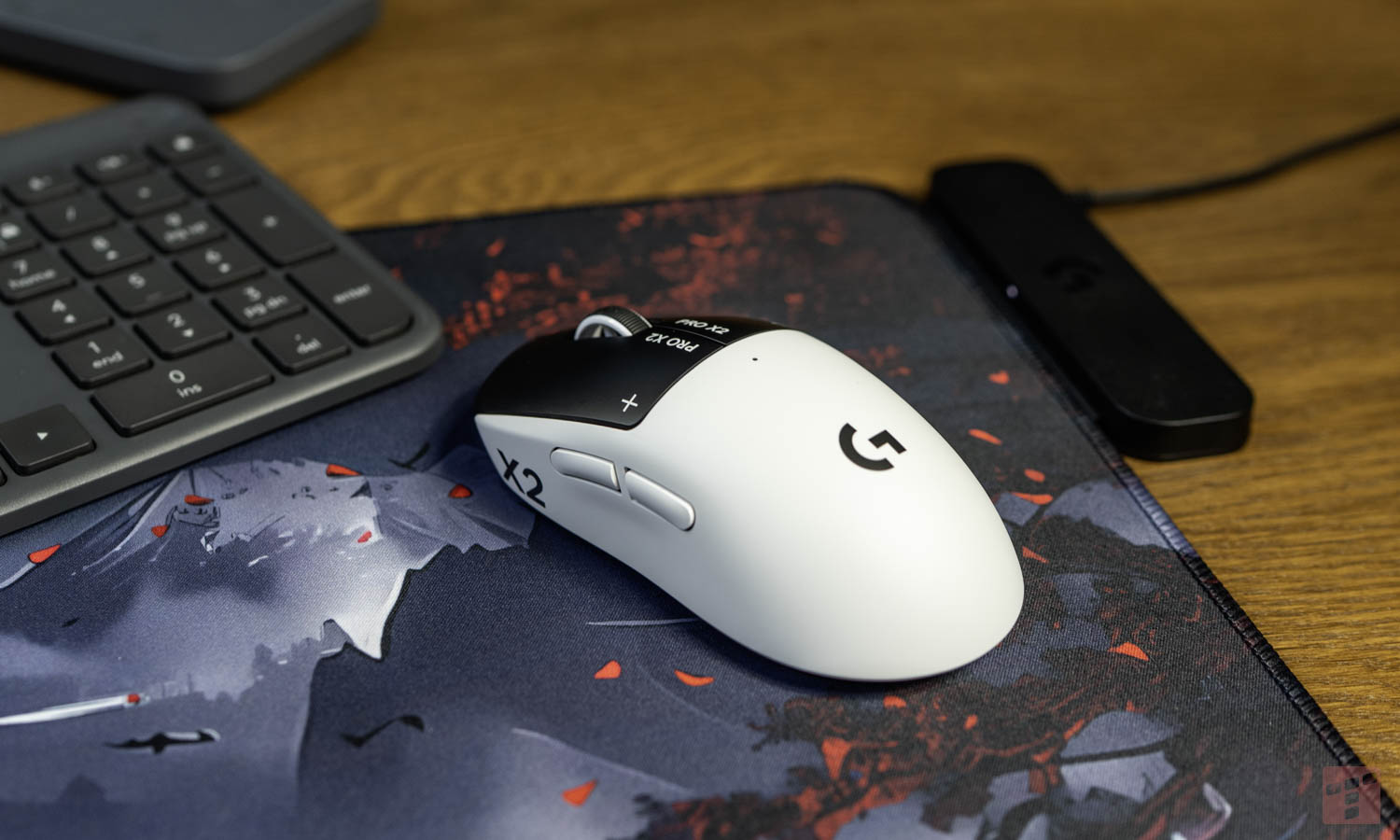
Logitech G Pro X2 Superstrike weighs only 61 grams, which is only 1 g more than the older Pro X Superlight 2 model. The new mouse also has the same shape and dimensions: 125 x 63.5 x 40 mm. People switching to a newer product from an older one will certainly appreciate it. For comparison, I would like to add that the MX Master 4 weighs as much as 150 g.
The housing of the new mouse is made of ABS plastic. This raw material is 49% recycled. Pro X2 Superstrike comes in the Lunar Eclipse color version. The top of the case is white, and the main buttons and the bottom of the mouse are black.
There are five buttons on the casing. The user has a left button, a right button and a push-button scroll wheel. There are two additional buttons on the left side of the device. The side keys are used by default for navigation in the web browser. They switch pages forward and backward. There is a physical power slider on the bottom of the device. Next to it there is a round cover for the hole supporting the PowerPlay system.
Wireless mouse, but they provided a cable
An unusual accessory that can be found in the Logitech G Pro X2 Superstrike box is a USB cable with type A and C plugs at the ends. With it, you can, among other things, charge the battery in the mouse. There is also another purpose that the manufacturer pays attention to.

The mouse described here connects to the computer wirelessly via a small receiver, which should be connected to the computer’s USB-A port. However, Logitech G recommends that the distance between the mouse and the receiver be no more than 20 cm. So we connect the cable to the computer, the adapter included in the set, and the receiver to it. This procedure is intended to reduce the risk of signal transmission interference in the 2.4 GHz band.

G HUB software – you can set everything up here
To make the Pro X2 Superstrike mouse work exactly as you want, use the Logitech G HUB program. It is available for computers with Windows and MacOS and is used to fully configure the “rodent” parameters.
The application allows, among other things, to change the operation of HITS switches. The system is based on depth measurement and the induction phenomenon. This solution completely eliminates the presence of traditional contacts under the buttons. The user selects the key activation point on a simple ten-point scale.
The Rapid Trigger function makes it easy to repeat clicks very quickly without fully releasing the button. The software offers five levels of sensitivity for this mechanism. The built-in haptic engine generates vibrations with every keystroke. G HUB provides five levels of feedback power.
Mouse haptics can also be turned off. This causes the button to freely collapse without any resistance under your finger and is very strange. We press the button and get no response that that’s it.
Logitech G Pro X2 Superstrike has an optical HERO 2 sensor with a resolution of 100 DPI to 44000 DPI. It works efficiently on any surface, as long as it is smooth enough. By juggling the resolution setting, we can decide how much hand movement is needed to achieve a specific movement on the screen. The mouse position reporting frequency reaches 8000 Hz. So the data is refreshed every 0.125 milliseconds. However, this is a feature that is important primarily for players.
Are you using Linux? You have to wait
On Linux, the controls are almost good. Solaar software, which is an open-source replacement for Logi Options+, sees the mouse but does not yet support its functions.


I found information on Github that this is planned. There is even a pull-request for support for this mouse, but it is not included in the main release yet. This will probably change soon.
A gaming mouse for office work
How does a gaming mouse work in office work? Very good. The low weight of the equipment greatly reduces the strain on your hands when working at a desk for many hours. The hand is much less tired when constantly moving the pointer across tables and system windows. The clicks of the main buttons are quiet and subtle. This sound is different from the loud clicking sound found in cheap mice and is closer to what can be experienced with the Logitech MX Master 4 model. Additionally, the symmetrical shape of the housing fits well to the hand.

However, not everything is perfect. For some time, the Logitech G Pro X2 Superstrike mouse was used by a left-handed person, who noticed that the side buttons were placed on the left side of the device for a right-handed person. In addition, the device connects to the computer only via a dedicated radio receiver in the 2.4 GHz band. Superstrike does not work with the universal Logi Bolt office standard. The scroll wheel only operates in ratchet mode. Each revolution of the roller generates a hard jump of the mechanism.
Pro X2 Superstrike vs. MX Master 4
Logitech MX Master 4 is the latest version of the popular office work tool. This equipment weighs 150 grams, so the Pro X2 Superstrike is 89 grams lighter. Such a difference is strongly felt after long-term use. However, the gaming mouse loses to the MX Master 4 model in the field of document viewing.

Logitech MX Master 4 has a built-in free wheel mode. The roller rotates without resistance and with high inertia. This allows you to quickly scroll through long texts, contracts and system logs. The Superstrike model is deprived of this function, which is of little use to gamers. The lack of a smooth mode forces you to constantly move your finger up or down.
Logitech MX Master 4 has more buttons and an additional roller. The side roller allows you to scroll the image horizontally. This makes it easier to navigate through wide spreadsheets. It also speeds up moving the timeline when editing video. Additional buttons can be assigned to various actions in the software. In this way, the user creates his own keyboard shortcuts for individual office programs. This increases work efficiency. The Pro X2 Superstrike model only has two side navigation keys and no side wheel. For this reason, MX Master 4 provides greater opportunities for people working in advanced applications.
However, there are people who are bothered by too many buttons – I am one of them. One of these people uses the mouse not in graphic programs, but rather as a keyboard support. What bothered her most about MX Master 4 was the button under the thumb. The mouse is heavy and I sometimes pressed this button involuntarily when lifting the mouse. There is no such problem in Logitech G Pro X2 Superstrike.

With this pad you will forget about the battery
Inside the housing, the manufacturer placed a 290 mAh battery. According to the manufacturer, this cell allows for 90 hours of continuous operation without using a cable. Setting high haptic vibration strength in G HUB drains the battery much faster. There is a small LED information diode on the back of the device. A drop in energy levels to 15 percent triggers a red warning light.
The mouse has a standard USB Type-C connector on the front of the housing. Connecting the power cord changes the color of the LED from red to green. Charging the battery does not interrupt the operation of the optical sensor.
The equipment optionally works with the PowerPlay wireless charging system. The desk mat charges the mouse while you use it. This completely eliminates the need to manually connect the power cable. The round cap on the bottom of the housing allows for quick installation of the charging module included with the mat. We can use this as a mouse pad or, after removing the top layer, place it under another pad.

The perfect mouse for office work
Logitech G Pro X2 Superstrike is a new wireless mouse designed mainly with gamers in mind. The device is distinguished by its very low weight, and its casing is partly made of recycled materials. The equipment is equipped with a sensitive optical sensor, and communication with the computer is carried out using a dedicated radio receiver.
The devices can be precisely and comprehensively configured in the manufacturer’s dedicated application. The software gives access to advanced settings, such as changing the activation point of switches or adjusting the vibration strength. The mouse has a built-in battery allowing for long operation, which is charged via a USB cable or a special charging pad, sold separately.

Despite its gaming purpose, the mouse works great in everyday office work. The lightness of the structure effectively prevents hand fatigue during many hours at the desk. However, the device is inferior to some office models in document navigation because it lacks free rotation of the wheel or an additional side roller. However, not everyone needs it.
The price of the Logitech G Pro X2 Superstrike model is PLN 769. On the one hand, it’s a lot, because there are mice costing less than PLN 50. On the other hand, you can drive a Mercedes, or you can drive a Dacia. I know someone who, after switching from MX Master 4, gives this mouse a rating of 10/10.
-
Very low weight,
-
Low hand strain during long hours of work,
-
Quiet and subtle clicks of main buttons,
-
Symmetrical shape adapted to the hand,
-
HITS switches and their wide configuration options,
-
Haptic engine with 5 levels of feedback power,
-
HERO 2 optical sensor,
-
Long battery life,
-
Possibility to charge with a USB-C cable and use a mouse at the same time,
-
Cooperation with the PowerPlay wireless charging system.
-
Scroll wheel operating only in ratchet mode (no free rotation),
-
Side buttons, designed for right-handed people,
-
Lack of cooperation with the universal Logi Bolt standard,
-
Lack of full support for configuration software in Linux,
-
High price.


